Access Control Policy
Define the rules for managing user access to your systems. Enforce least privilege, MFA, and regular access reviews.
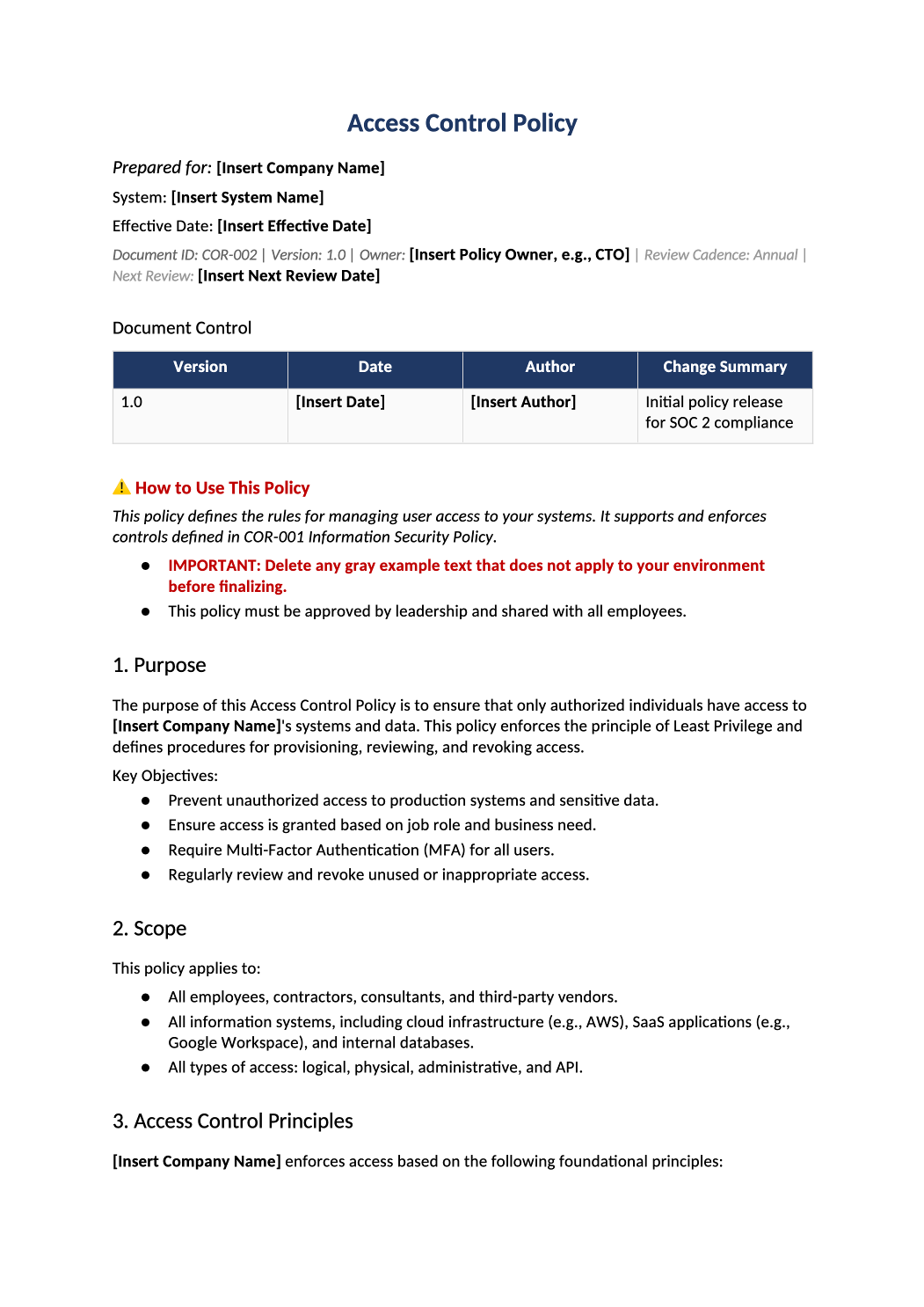
Control who accesses what, and when.
Provisioning, deprovisioning, MFA enforcement, privileged access, and access review procedures — all in one auditor-ready policy template.
Download Access Control Policy (.docx)Access control policy template — This policy defines the rules for managing user access to your systems. It supports and enforces the controls defined in your master Information Security Policy (COR-001). Auditors will test this policy by reviewing evidence of how you grant, review, and revoke access.
Recommended Owner: CTO, Head of Engineering, or Security Lead | Approval Required: Executive Leadership (CEO/CTO)
Section 1
How Auditors Use This Policy
Auditors review this document to:
- Verify that access is granted based on Least Privilege and Role-Based Access Control (RBAC).
- Confirm that Multi-Factor Authentication (MFA) is enforced for all users.
- Validate that access reviews are conducted regularly (quarterly).
- Ensure that terminated employees lose access immediately.
This policy must accurately reflect your actual operational practices. Auditors will validate statements here against technical evidence (e.g., Okta logs, AWS IAM settings) and employee interviews.
Section 2
Getting Started
- Enable Editing: Click “Enable Editing” if prompted by Word.
- Understand Placeholders:
-
Bold Black Brackets [Like This] Mandatory fields. Replace with your specific information.
-
Regular Brackets [like this] Instructional guidance or examples. Replace with your actual environment details.
Policy vs. Procedure: This document defines high-level requirements. Detailed step-by-step instructions (“How to create a user in Okta”) should be maintained separately as operational procedures.
Section 3
Critical Implementation Rules
To ensure this policy passes auditor scrutiny, follow these rules when customizing and implementing it:
- Evidence-First Mindset: Every statement must be supported by observable evidence (IAM logs, ticketing records). Avoid absolute claims unless you can prove them.
- Define Your Identity Source: Clearly define your authoritative source for user identity (HRIS like BambooHR, or IdP like Okta/Google).
- Realistic SLAs: Set provisioning/deprovisioning SLAs in Section 5 that are measurable and enforceable. Consistency matters more than speed.
- Tool Mapping Consistency: Ensure the tools mentioned here match your actual production stack documented in SOC-004.
- Separation of Duties: If full SoD isn’t feasible, document compensating controls in Section 6.3.
- Secrets & API Keys: Ensure Section 6.2 explicitly mentions that secrets are stored in a secure vault and never hardcoded.
- Access Review Evidence: Ensure your reviews produce standardized artifacts retained for at least 12 months.
- Break-Glass Post-Mortem: All emergency access events must trigger a post-access review within 24–72 hours.
Document tour
Section-by-section walkthrough
Open the downloaded COR-002 file in Microsoft Word. Use the headings below as your checklist — complete each section before the final approval block.
- Replace [Insert Company Name] and confirm the objectives match what you actually commit to in SOC 2 and customer contracts.
- Delete gray example bullets if they do not apply to your stage (e.g., GDPR if you have no EU data).
- List every workforce type (employees, contractors) and every system class in scope (prod, corporate IT, SaaS admin consoles).
- Align wording with SOC-004 System Description and SOC-002 scoping answers.
- Keep principles short and testable — they should match what COR-002 and your SSO/MFA setup actually do.
- Fill the roles table with real names or titles — match COR-005 Organizational Chart if you use it.
- If one person wears multiple hats, document that explicitly; auditors expect named accountability.
- Document realistic joiner/mover/leaver timelines (e.g., revoke access within 24 hours of termination).
- Point to HR-001/HR-002 checklists or your ticketing workflow as evidence.
- Complete subsections 6.1–6.3: break-glass, service accounts, and separation of duties — do not skip if you are pre-revenue.
6.1 Emergency Access (Break-Glass)
- Name who can invoke break-glass, how it is logged, and how access is revoked after the event.
6.2 Service Accounts
- Inventory API keys and automation accounts; state that secrets live in a vault, not in code repos.
6.3 Separation of Duties
- If the same person deploys and approves code, document compensating controls (peer review, CI checks).
- Replace examples with your real IdP (Okta, Google Workspace, etc.), MFA coverage, and password standards.
- Name your SIEM or log store and retention period — align with SOC-008 if you use that standard.
- Set a quarterly cadence and reference SOC-010 / SOC-018 for the actual review evidence.
- List how vendor accounts are provisioned, time-bound, and removed when contracts end.
- Document how exceptions are requested, approved, and time-boxed — use COR-015 exception log if applicable.
- Document how exceptions are requested, approved, and time-boxed — use COR-015 exception log if applicable.
- Complete the signature table with name, title, and date — store the signed PDF for auditors.
13.1 SOC 2 Common Criteria Mapping
- Leave mapping tables as-is unless your scope excludes criteria; they help auditors navigate the policy.
Section 5
Approval and Sign-off
A policy is not valid until it is approved.
- Action: Have your CEO or CTO review the document.
- Sign-off: Use the signature block in Section 13 to formally approve the policy.
- Evidence: Retain evidence of approval (signed PDF, Slack approval, or board meeting notes) for audit purposes.
Section 6
Distribution and Training
- Publish: Publish the approved version in a centralized location accessible to employees (Notion, Confluence, SharePoint, or HRIS).
- Acknowledge: Require employees (especially engineers and admins) to acknowledge they have read and understood the policy.
- Train: Include key points from this policy (MFA, password hygiene, access requests) in your annual security awareness training.
Section 7
Maintenance and Governance
- Review Triggers: Review this policy annually, or after significant changes to your identity infrastructure.
- Exceptions: Any exception to this policy (temporary MFA bypass) must be documented, approved, and time-bound.
- Version Control: Update the version number in the Document Control table when changes are made.
Pro Tips
Pro Tips for Success
- Be Realistic About SLAs: Don’t promise “immediate” provisioning if your team takes 2 days. Set realistic Service Level Agreements (SLAs) in Section 5 that you can actually meet.
- Document Your Reviews: The most common audit finding is “Access reviews were not documented.” Ensure you save exports from your IAM tool (Okta, AWS, etc.) showing who reviewed what and when.
- Separate Duties: If you are a small team, you may not have full Separation of Duties. Acknowledge this in Section 6.3 and describe compensating controls.
- Map to SOC 2: Use the SOC 2 CC Mapping Table (Section 13.1) to show auditors exactly where your policy covers their required criteria (CC6.1–CC6.8).
FAQ
Frequently Asked Questions
If you are a cloud-only startup with no servers on-premise, you can note that physical access is managed by your cloud provider (AWS/Azure) and inherited via their SOC 2 report.
You can use email or Slack, but ensure there is a recorded approval from a manager before IT grants access. Document this workflow in Section 5.
SOC 2 best practice is quarterly for privileged/admin access and annual for all other users. Start with quarterly for admins if you are early-stage.
These are emergency admin accounts used only when standard access methods fail (e.g., MFA outage). They should be strictly controlled, logged, and reviewed after every use.