How to Fill Out the Consumer Rights Request Procedure
Policy Overview & Usage Guide for GDPR, CCPA/CPRA, and DSAR compliance workflows.
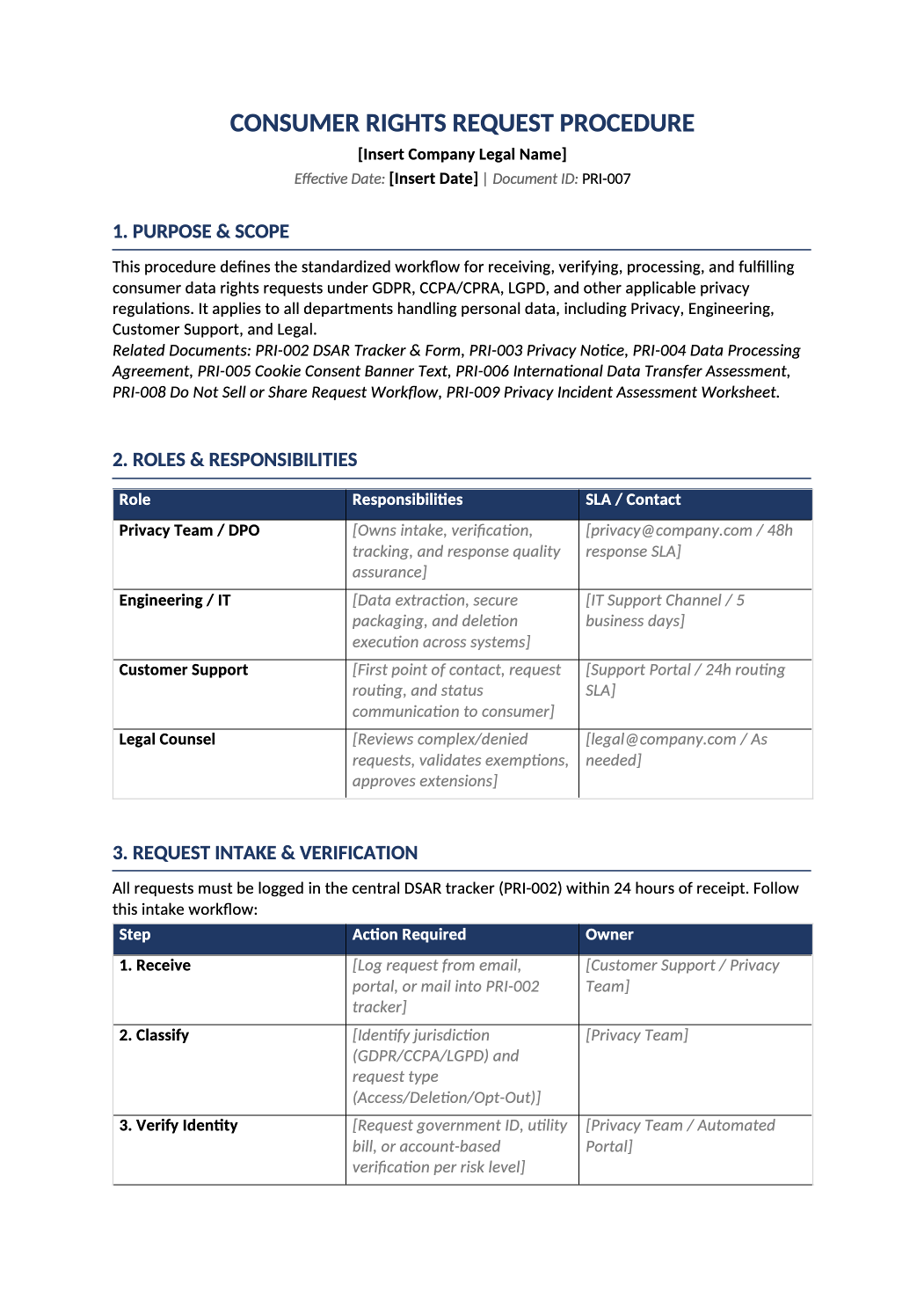
Standardize DSAR handling in one operational document.
This document is the Standard Operating Procedure (SOP) for handling Data Subject Access Requests (DSARs). It defines how your team receives, verifies, processes, and fulfills consumer data rights under GDPR, CCPA/CPRA, and other regulations.
This document is the Standard Operating Procedure (SOP) for handling Data Subject Access Requests (DSARs). It defines how your team receives, verifies, processes, and fulfills consumer data rights under GDPR, CCPA/CPRA, and other regulations.
Recommended Owner: Data Protection Officer (DPO), Privacy Lead, or Compliance Manager | Approval Required: Executive Leadership (CEO/CTO) + Legal Counsel
Section 1
Getting Started
- Understand the Brackets: [Bold Black Brackets] = Mandatory fields you must replace (company names, email addresses, specific SLAs). [Italic Gray Brackets] = Examples/guidance showing exactly what to write. Replace them with your actual operational details, or delete them if they don’t apply.
- Legal Review: This is an internal compliance SOP. Always have qualified counsel review before finalizing operational workflows.
- Map, Don’t Recreate: You likely already have ticketing systems, identity providers, and security tools. Use this SOP to connect them into a compliant workflow—don’t build new processes from scratch.
Replace all bracketed content before internal sign-off. Ensure the SOP matches your live tooling and intake channels.
Section 2
Key Things to Decide
Before filling out the document, clarify these operational points:
-
Which intake channels do we support? Email, Web Portal, Mail, Phone? You need a dedicated, monitored inbox (e.g., privacy@…).
-
What is our verification stack? How do you verify identity today? Map simple email confirmation vs. notarized ID to the risk tiers in Section 3.2.
-
What are our real SLAs? Legal max is usually 30/45 days, but what is your internal target? (15-20 days to leave a buffer).
-
Where does personal data live? CRM, Analytics, Support Desk, Backups? List these in Section 4.1. Cross-check with your RoPA (PRI-001).
Section 3
How to Fill Out the Tables
Every table includes [italic gray sample text] to guide you. Here’s how to apply your actual controls to each one:
- 1Section 2: Roles & Responsibilities
Purpose: Maps who does what in the DSAR workflow.
Action: Replace examples with actual job titles, ticket queues (Jira DSAR, Zendesk Privacy), and distribution lists. Ensure the SLA column matches your ticketing system’s actual routing times. - 2Section 3: Request Intake & Verification
Purpose: Defines how requests enter your system and how identity is confirmed.
Action: 3.1 Intake Channels: List only the channels you actually monitor. Link directly to your web form or support portal. 3.2 Verification Tier Matrix: Map your auth stack (Okta, Auth0, Persona) to the risk tiers. Example: Low = Email magic link, High = Notarized ID + video call. 3.3 Authorized Agent: Confirm your process for agents (CCPA). Do you require Power of Attorney? Update the example to match your legal requirement. - 3Section 4: Processing Workflow & Data Mapping
Purpose: Ensures comprehensive data discovery and fulfillment.
Action: 4. Processing Workflow: Map the action taken for each right. Replace examples with your actual extraction/deletion methods (e.g., Run SQL script X, Use vendor API Y). 4.1 Data Source Inventory: Critical Audit Step. Pull system names directly from your infrastructure inventory (CMDB). If a system isn’t listed here, it might be missed during a DSAR. Validate this list with Engineering quarterly. - 4Section 6: Exception Handling & Escalation
Purpose: Provides a clear path when requests cannot be fulfilled normally.
Action: 6.1 Escalation Matrix: Replace generic roles with actual names/titles. Tie time limits to your existing incident response tools (PagerDuty, ServiceNow). 6.2 Denial Templates: Review the pre-written text. It is legally vetted but adjust placeholders ([Request ID], [specific legal obligation]) to fit your company voice if needed. - 5Section 7: Deadlines & Extensions
Purpose: Centralizes legal timelines for quick reference.
Action: Check the boxes or rows for the laws that apply to you. Set your Internal target (15 days) lower than the Legal limit (30/45 days) to ensure you never miss a deadline.
Section 4
Before You Finalize
- Did you replace all [Bold Brackets] with your actual company details and contacts?
- Did you update the [Italic Gray Examples] in the Verification Matrix to match your actual security controls?
- Is the Data Source Inventory (4.1) complete? (Cross-check with your RoPA/PRI-001).
- Did you remove any intake channels (Toll-Free Number) that you do not actually support?
- Are the Escalation Time Limits realistic for your team?
- Has Legal Counsel reviewed the Denial Templates and Exemption wording?
- Are both approval signatures complete with names, titles, and dates?
Section 5
Where to Store & Execute It
-
Publication This is an internal SOP. Store it in your secure compliance repository (e.g., SharePoint, Drive, Compliance Platform).
-
Training Distribute this to Customer Support and Engineering. Conduct a training session using Section 10 as the agenda.
-
Audit Evidence When auditors ask, “How do you handle DSARs?”, you show them this signed SOP and the PRI-002 DSAR Log.
-
Review Cadence Review this document annually or whenever you add new data systems or change your verification tools.
Pro Tips
Best Practices for DSAR Management
- Keep the Data Source Inventory Fresh: The #1 cause of DSAR failures is missing a system. Review Section 4.1 every time Engineering deploys a new database.
- Don’t Over-Verify: Under CCPA, you shouldn’t ask for more information than you already hold just to verify identity. Follow the risk tiers to avoid privacy violations.
- Track KPIs: Use Section 9 to report to leadership. Showing “100% SLA Compliance” is a great way to prove the value of your privacy program.
- Test Your Process: Once a quarter, have a team member submit a fake DSAR to test the workflow from intake to deletion.
FAQ
Frequently Asked Questions
You may request a limited extension (usually 15-30 additional days) under GDPR if the request is complex or you’re handling multiple requests from the same individual. You must notify the requester before the original deadline expires and explain the reason for the delay.
Yes, but you must document the justification thoroughly, provide a clear written denial using the templates in Section 6.2, and inform the individual of their right to complain to a supervisory authority. Consult legal counsel before issuing any denial.
Yes. While you may not be required to delete data from immutable backups immediately, you must disclose their existence in your response and ensure that backed-up data is isolated from active processing or marked for deletion at the next backup rotation.