Contractor Onboarding Checklist Guide
Background checks, NDAs, least-privilege access, and vendor security requirements for contractors.
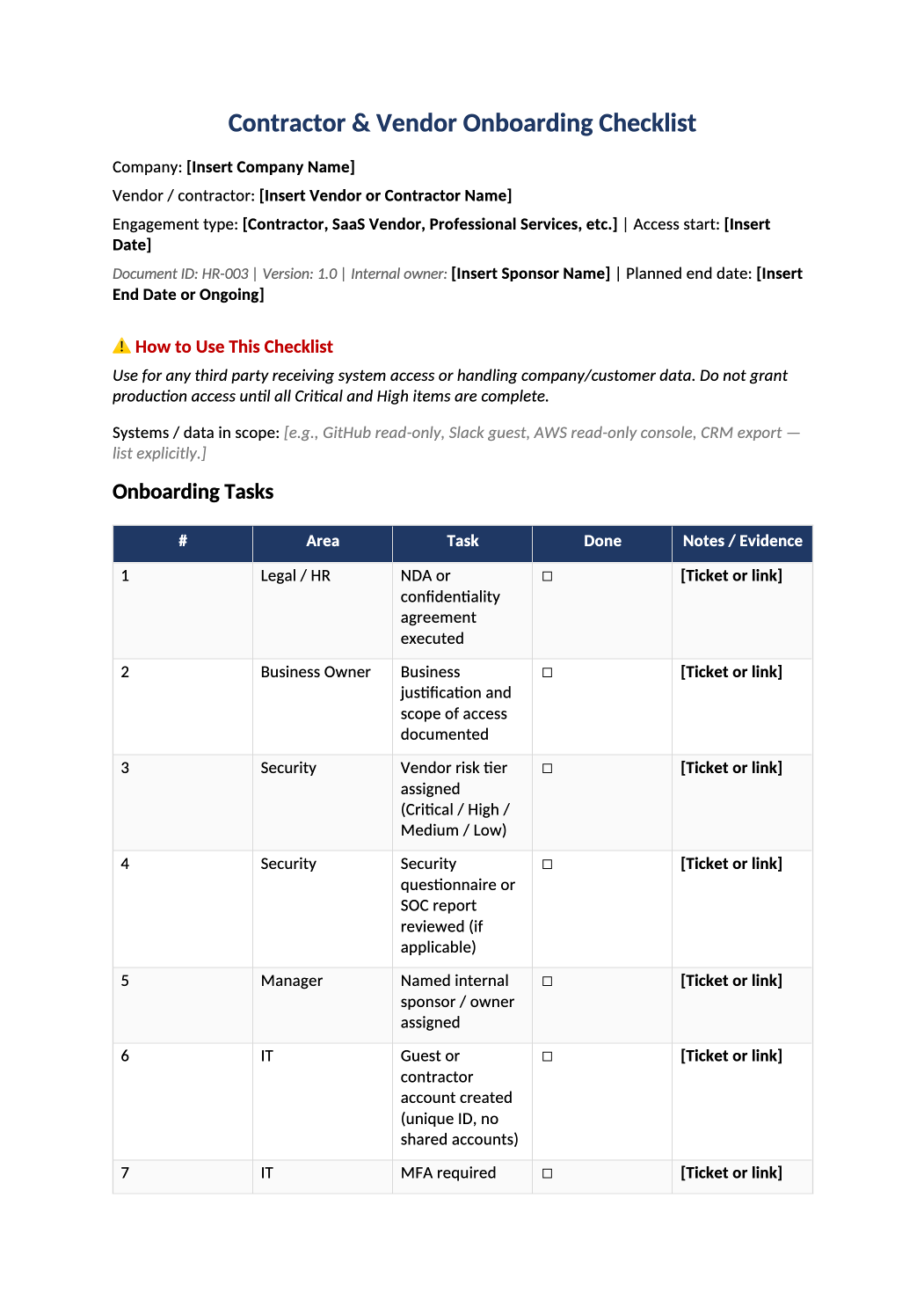
Contractor and Vendor Onboarding Checklist
Background checks, NDAs, least-privilege access, and vendor security requirements for contractors.
Contractor onboarding checklist template — Apply this checklist to contractors and vendors with system access. Mirror employee onboarding controls where risk is equivalent.
Recommended Owner: Procurement or Security | Legal for contract terms
What this file is for
Document purpose
Contractor/vendor onboarding with security parity to employees (CC6.2, CC9.1).
In your program: One checklist per contractor or vendor with system access; tier in COR-008 and register in SOC-014.
Before you start
Getting Started
- Create a copy per contractor or vendor — fill company, vendor name, engagement type, access start, sponsor, and planned end date.
- List Systems / data in scope explicitly (e.g., GitHub read-only, Slack guest) — no vague “full access”.
- Do not grant production or customer-data access until rows 3–4 (risk tier + review) and rows 6–8 (identity + MFA + least privilege) are Done.
Document tour
Fill out the file section by section
Work through the sections below in order. Each block matches a heading or tab in the downloaded HR-003 file.
- Replace Company, Vendor/contractor name, Engagement type, Access start, Internal owner (sponsor), and Planned end date.
- In Systems / data in scope, list each system and access level — auditors compare this to IdP groups and SOC-004.
- Work top to bottom — Area column shows Legal/HR, Business Owner, Security, Manager, or IT ownership.
- Mark Done only when complete; Notes / Evidence must have a ticket ID, SOC report link, or date.
- Critical/High vendor tiers (rows 3–4) must complete before any production access — align tier with COR-008.
Rows 1–2 · Legal & business case
- Row 1: NDA or confidentiality agreement executed and stored (Legal folder or CLM).
- Row 2: Sponsor documents why access is needed, which systems, and duration — reject “general consulting” without scope.
Rows 3–5 · Risk & ownership
- Row 3: Assign tier (Critical / High / Medium / Low) using your COR-008 criteria — same labels as SOC-014.
- Row 4: For High/Critical: collect SOC 2 Type II, SIG, or completed questionnaire; note exceptions in COR-014 if used.
- Row 5: Named internal sponsor accountable for access and offboarding — not a shared team inbox.
Rows 6–8 · Identity & access
- Row 6: Guest/contractor IdP account — unique ID, no shared credentials with employees.
- Row 7: MFA enforced before prod or customer-data systems (same standard as HR-001 row 7).
- Row 8: Provision only approved systems from header scope — document groups/roles in ticket.
Rows 9–12 · Policy, lifecycle & evidence
- Row 9: COR-011 acceptable use acknowledged — same attestation pattern as employees.
- Row 10: End date or “ongoing with quarterly review” — must trigger HR-002 when engagement ends.
- Row 11: Include contractor accounts in next SOC-010 access review cycle.
- Row 12: File completed checklist PDF; Business Owner retains for CC9.1 / CC6.2 sampling.
- Internal Sponsor confirms business need and scope; Security / IT confirms rows 3–8 complete.
- Delete gray sample names before filing or auditor review.
- Reference only — use HR-002 at offboarding, SOC-014 for vendor register, COR-008 for tiering and review cadence.
Quality check
Before You Finalize
- Every task row marked Done with ticket URL or date in Notes / Evidence.
- Planned end date or offboarding trigger documented (row 10) — ties to HR-002 when engagement ends.
- Sign-off from internal sponsor and Security/IT before access goes live.
Evidence
Where to Store It
- Store the completed file in your compliance evidence folder (signed PDF for policies).
- Register the document in COR-013 with version, owner, and next review date.
- Link the file from your evidence index or SOC-005 project plan when you use Phase 3 trackers.