Control Ownership Matrix Guide
Assign named owners and teams to each in-scope control.
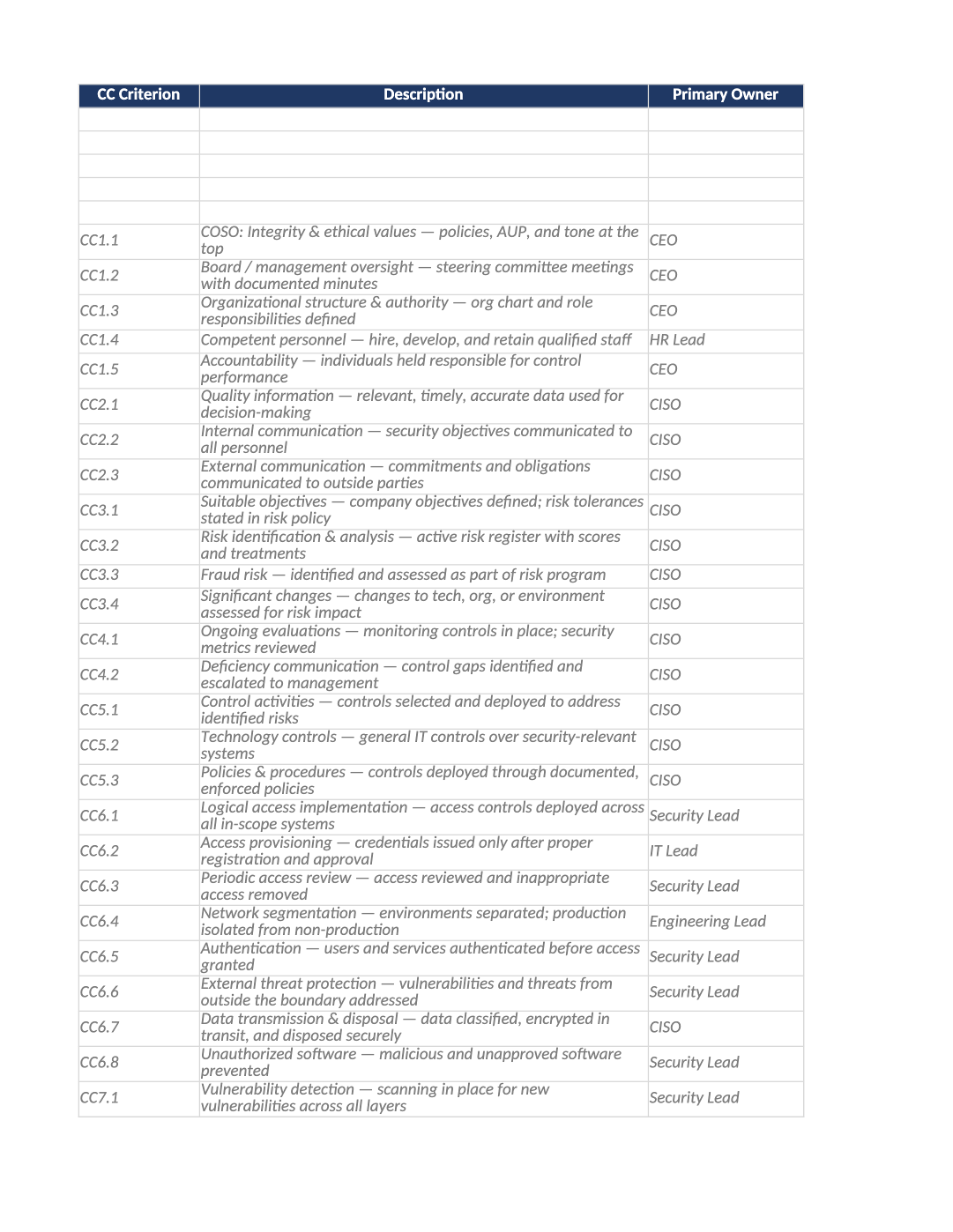
Control Ownership Matrix
Assign named owners and teams to each in-scope control.
SOC 2 control ownership matrix — Must match SOC-003 Control Register owners — auditors ask control owners during interviews.
Recommended Owner: Security Lead | Each control owner validates their rows
What this file is for
Document purpose
Named owners per CC criterion area for interviews and PBC (CC1.3).
In your program: Primary Owner emails must match people briefed on SOC-031 Q&A sections.
Before you start
Getting Started
- Enable Editing; read the Instructions sheet first for tab order and version metadata.
- Use dropdowns in validated columns; delete gray sample rows before auditor samples.
- Check Dashboard after updates — formulas flag gaps and acceptance rates.
Document tour
Fill out the file section by section
Work through the sections below in order. Each block matches a heading or tab in the downloaded SOC-024 file.
- Sync after SOC-003 scoping; notify each Primary Owner in writing.
- After editing Instructions, search for `[` placeholders and gray sample names — auditors flag incomplete templates.
- CC Criterion = trust services category (CC6, CC7) — aligns with SOC-031 sections.
- Frequency = how often control operates (continuous, quarterly) — must match evidence cadence.
- Evidence Sources = comma-separated COR/SOC IDs (e.g., SOC-010, COR-002).
CC Criterion
- Fill CC Criterion for every in-scope row on Control Owners — use dropdowns where provided.
- Do not leave cells blank for active records; use N/A with a short reason if truly not applicable.
Description
- Fill Description for every in-scope row on Control Owners — use dropdowns where provided.
- Do not leave cells blank for active records; use N/A with a short reason if truly not applicable.
Primary Owner
- Name a person (not a team inbox) in Primary Owner — auditors interview control owners.
- Must match COR-005 org chart or SOC-024 control owner assignments where applicable.
Backup Owner
- Name a person (not a team inbox) in Backup Owner — auditors interview control owners.
- Must match COR-005 org chart or SOC-024 control owner assignments where applicable.
Frequency
- Fill Frequency for every in-scope row on Control Owners — use dropdowns where provided.
- Do not leave cells blank for active records; use N/A with a short reason if truly not applicable.
Evidence Sources (Toolkit Doc IDs)
- Fill Evidence Sources (Toolkit Doc IDs) with a URL, ticket, or export path auditors can open — not a local-only path.
- Re-verify links before fieldwork; broken evidence links are a common audit finding.
Escalation Contact
- Fill Escalation Contact for every in-scope row on Control Owners — use dropdowns where provided.
- Do not leave cells blank for active records; use N/A with a short reason if truly not applicable.
Notes
- Fill Notes for every in-scope row on Control Owners — use dropdowns where provided.
- Do not leave cells blank for active records; use N/A with a short reason if truly not applicable.
Quality check
Before You Finalize
- Backup Owner and Escalation Contact filled for every in-scope CC row.
- Evidence Sources column lists real toolkit doc IDs you will produce.
Evidence
Where to Store It
- Store the completed file in your compliance evidence folder (signed PDF for policies).
- Register the document in COR-013 with version, owner, and next review date.
- Link the file from your evidence index or SOC-005 project plan when you use Phase 3 trackers.