How to Use the Data Processing Agreement
Policy Overview & Usage Guide for GDPR Article 28 and CCPA/CPRA-compliant vendor agreements.
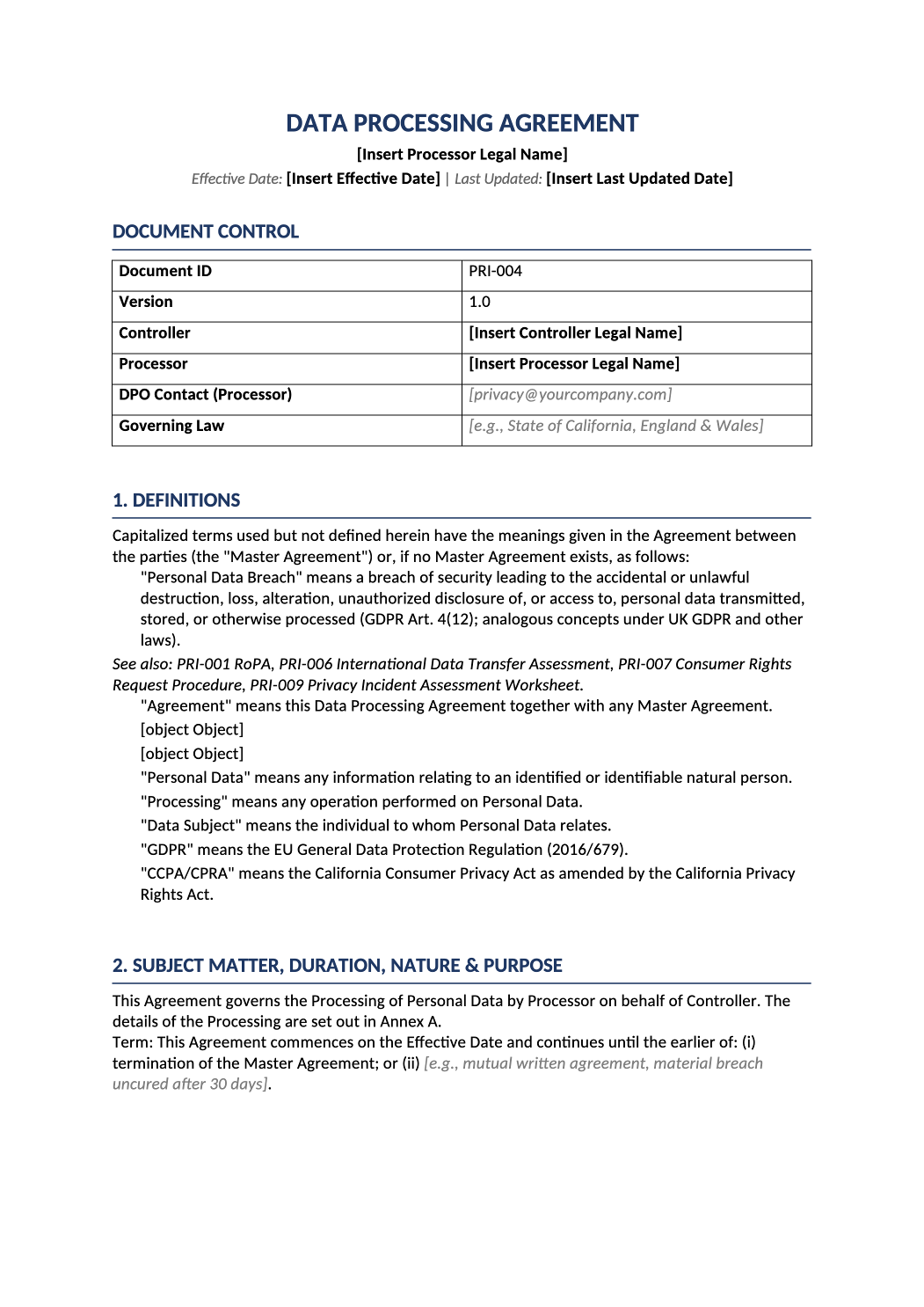
Define vendor data obligations in one document.
This template is your GDPR Article 28 and CCPA/CPRA-compliant Data Processing Agreement. It defines the legal relationship, security obligations, and data handling rules between your company and vendors who process personal data on your behalf.
Data processing agreement template — This template is your GDPR Article 28 and CCPA/CPRA-compliant Data Processing Agreement. It defines the legal relationship, security obligations, and data handling rules between your company and vendors who process personal data on your behalf.
Recommended Owner: Privacy Officer, Legal Counsel, or Compliance Lead | Approval Required: Executive Leadership (CEO/CTO) + Legal Review
Section 1
Getting Started
- Understand the Brackets: [Bold Black Brackets] = Mandatory fields you must replace (legal names, dates). [Italic Gray Brackets] = Examples/guidance showing you exactly what to write. Replace or delete them to match your actual practices.
- Legal Review: This is a binding contract. Always have qualified counsel review before execution.
- Coordinate Early: Share a draft with your vendor or customer to align on Annex details before signing.
Replace all bracketed content before execution. Never leave placeholder text in a signed agreement.
Section 2
Key Things to Decide
Before filling out the document, clarify these points:
-
Who is Controller vs. Processor? If you’re hiring a vendor to process user data, you’re the Controller. If you’re providing a service that processes client data, you’re the Processor.
-
What data is being processed? Reference your RoPA (PRI-001) to list accurate data categories and subjects in Annex A.
-
Which security measures apply? Use Annex B to document your actual technical controls. Don’t promise what you don’t do.
-
Which sub-processors are authorized? List categories in Annex C, and link to your public sub-processor page if you maintain one.
-
What is your governing law & SCC module? Specify the jurisdiction for disputes and select the correct Standard Contractual Clauses module for international transfers.
Section 3
How to Fill Out the Tables
Every table in this document includes italic gray sample text to guide you. Here’s how to use each one efficiently:
- 1Document Control Table
Purpose: Identifies the legal parties, version, and governing jurisdiction.
Action: Replace the bold bracketed fields with your official legal entity names and chosen governing law. Leave PRI-004 and 1.0 as-is unless you’re issuing an amendment. - 2Annex A: Details of Processing
Purpose: Maps what data is processed, why, and for whom.
Action: Use the gray samples as a starting point. Customize the data types and subject categories to match your actual data flows. Add or remove categories as needed. - 3Annex B: Security Measures
Purpose: Documents the technical and organizational safeguards protecting the data.
Action: Keep only the controls you actually implement. Update placeholders ([RTO: 4 hours], [90-day log retention]) to match your actual SLAs. Delete rows for controls that don’t apply. - 4Annex C: Authorized Sub-Processors
Purpose: Lists the third-party vendors involved in processing.
Action: Update the locations and provider names to reflect your actual vendor stack. If you maintain a public sub-processor page, replace the table entirely with your URL and a [Last updated: YYYY-MM-DD] field. - 5Annex D: Standard Contractual Clauses (SCCs)
Purpose: Provides the legal mechanism for international data transfers.
Action: Select the correct SCC module (Controller-to-Processor or Processor-to-Processor). Fill in the governing law, forum, and supervisory authority fields. Consult legal counsel to ensure these align with your transfer risk assessments. - 6Version History Table
Purpose: Maintains an audit trail of changes.
Action: Add a new row each time you amend the DPA. Record the version number, effective date, and a brief summary of what changed.
Section 4
Before You Finalize
- Did you replace all [Bold Black Brackets] with your actual legal entity details?
- Did you update or remove all [Italic Gray Examples] to match your actual practices?
- Does Annex A accurately reflect the data processing described in your RoPA (PRI-001)?
- Does Annex B list only security measures you currently implement?
- Is the sub-processor list in Annex C current, or is the provided URL valid?
- Have you selected the correct SCC module and governing law in Annex D?
- Has legal counsel reviewed and approved the final draft?
- Are both signature blocks complete with names, titles, dates, and signatures?
Section 5
Where to Store & Execute It
-
Execution Sign electronically or wet-ink. Store the fully executed copy in your compliance evidence folder.
-
Vendor Records Attach the executed DPA to the vendor’s profile in your vendor risk management system.
-
Link to Other Docs Reference this DPA in your Privacy Notice (PRI-003) and onboarding materials.
-
Review Cadence Revisit this agreement annually or whenever processing activities change significantly.
Pro Tips
Best Practices for DPA Management
- Keep It Realistic: Don’t overpromise security controls or data handling practices. Auditors verify Annex B against your actual environment.
- Treat Annexes as Living Documents: Annexes A-C should be updated when processing activities change. Re-execute the DPA if material changes occur.
- Align with Your Privacy Program: Ensure the DPA aligns with your Privacy Notice (PRI-003) and RoPA (PRI-001) for consistent messaging and audit readiness.
- Track Versions Consistently: Always update the Version History table. It’s often the first thing auditors check to verify document control.
FAQ
Frequently Asked Questions
Yes. This is a legally binding contract. Always have qualified counsel review before execution, especially for Annex D SCC selections and governing law clauses.
You can use the same template, but Annexes A-C must be customized per vendor based on what data they process, what security measures they implement, and which sub-processors they use.
Review annually or whenever processing activities change significantly. If you add new sub-processors or change data flows, update Annexes A-C and re-execute if material changes occur.