How to Use the “Do Not Sell or Share” Request Workflow
Policy Overview & Usage Guide for CCPA/CPRA opt-out compliance workflows.
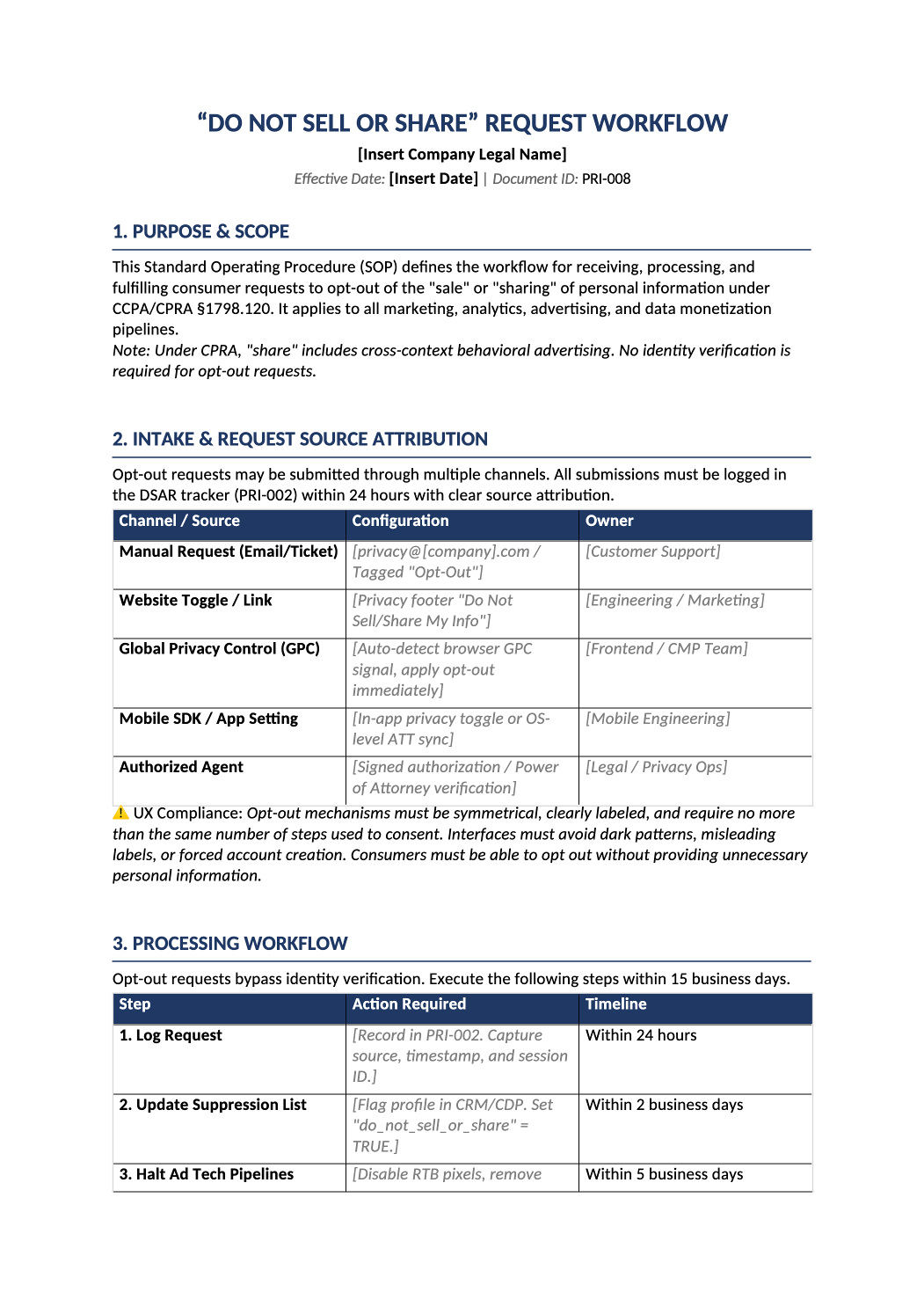
Standardize CCPA opt-out handling in one operational document.
This document is your operational Standard Operating Procedure (SOP) for fulfilling CCPA/CPRA “Do Not Sell or Share” opt-out requests. Instead of treating it as a fill-in-the-blank exercise, use it as a bridge between your marketing tech stack, engineering pipelines, and compliance requirements.
Do not sell or share request workflow — This document is your operational Standard Operating Procedure (SOP) for fulfilling CCPA/CPRA “Do Not Sell or Share” opt-out requests. Instead of treating it as a fill-in-the-blank exercise, use it as a bridge between your marketing tech stack, engineering pipelines, and compliance requirements.
Recommended Owner: Data Protection Officer (DPO), Privacy Engineer, or Marketing Ops Lead | Approval Required: Executive Leadership (CEO/CTO) + Legal Counsel
Section 1
Getting Started
- Understand the Brackets: [Bold Black Brackets] = Mandatory fields you must replace (e.g., company contacts, specific SLAs, system names). [Italic Gray Brackets] = Examples/guidance showing the level of detail expected. Replace them with your actual technical configurations or delete if not applicable.
- Map, Don’t Recreate: You likely already have a CMP, CDP, CRM, and ad tech stack. This SOP exists to connect them into a compliant, auditable workflow.
Replace all bracketed content before internal sign-off. Ensure the SOP matches your live tooling and intake channels.
Section 2
Key Things to Decide
Before filling out the document, clarify these operational points:
-
Which opt-out channels do we support? Website link, GPC, email, toll-free, mobile app? Ensure each is monitored and logged in the DSAR tracker (PRI-002).
-
What is our tech sync cadence? How fast does your CDP push suppression lists to ad platforms? (Real-time, hourly, daily?). Map this to Section 4.
-
How do we verify vendor compliance? Do vendors provide API receipts, dashboard attestations, or SFTP checksums? Document the tracking method in Section 5.
-
What’s our suppression retention policy? Opt-out flags must persist indefinitely to prevent accidental re-targeting. Align Section 6 with your data retention schedule.
-
Who handles QA & testing? Assign engineering/privacy ops to run the quarterly GPC and pixel-validation checks outlined in Section 8.
Section 3
How to Fill Out the Tables
Every table includes [italic gray sample text] to guide you. Here’s how to apply your actual controls:
- 1Section 2: Intake & Request Source Attribution
Purpose: Maps where opt-outs originate and who owns each channel.
Action: Replace examples with your actual URLs, email aliases, or ticket queues. Ensure GPC detection is enabled in your CMP configuration. - 2Section 3: Processing Workflow
Purpose: Step-by-step fulfillment timeline (15 business days max under CPRA).
Action: Match each step to your internal systems. Example: Step 2 = CDP profile flag, Step 3 = RTB pixel suppression, Step 6 = QA spot-check. Update timelines if your engineering SLAs differ. - 3Section 4: Technical Implementation & Sync Frequency
Purpose: Ensures consistent data flow across your stack.
Action: Replace examples with your actual integration methods (e.g., Segment → Google Ads, Salesforce → HubSpot). Specify exact sync frequencies (real-time, hourly, daily) based on your vendor API limits. - 4Section 5: Vendor & Subprocessor Synchronization
Purpose: Tracks how downstream partners receive and confirm opt-out signals.
Action: List your actual ad networks, analytics providers, and data brokers. Replace notification methods with your real implementation (IAB GPP string, SFTP suppression file, API push). - 5Section 6: Record Keeping & Suppression Retention
Purpose: Defines audit evidence requirements and retention rules.
Action: Confirm your suppression database is encrypted and access-controlled. Ensure opt-out flags are explicitly excluded from routine data purging cycles. - 6Section 8.1: Testing & QA + 8.2: Known Limitations
Purpose: Proves proactive compliance and documents compensating controls.
Action: Fill the testing checklist with your actual validation tools (browser dev tools, pixel debuggers, API logs). In the limitations table, document real constraints (legacy system delays) and the workaround/mitigation you’ve implemented.
Section 4
Before You Finalize
- Did you replace all [Bold Brackets] with actual company contacts, system names, and SLAs?
- Did you update [Italic Gray Examples] to match your actual tech stack and vendor contracts?
- Is GPC auto-detection enabled and tested across supported browsers?
- Do sync frequencies in Section 4 align with your engineering team’s actual integration capabilities?
- Have you documented compensating controls for any known system limitations (Section 8.2)?
- Did Legal Counsel review the dark pattern compliance warning and vendor notification requirements?
- Are both approval signatures complete with names, titles, and dates?
Section 5
Where to Store & Execute It
-
Publication This is an internal SOP. Store it in your secure compliance repository alongside PRI-002 (DSAR Log) and PRI-004 (DPA).
-
Training Distribute to Engineering, Marketing Ops, and Customer Support. Use Section 8.1 as a quarterly checklist.
-
Audit Evidence When auditors ask, “How do you enforce CCPA opt-outs?”, provide: (1) This signed SOP, (2) PRI-002 log entries tagged “Opt-Out”, (3) GPC detection logs & vendor confirmation receipts.
-
Review Cadence Review annually or whenever you add/remove ad tech vendors, update your CMP, or change sync frequencies.
Pro Tips
Best Practices for Opt-Out Workflows
- Never Delete Suppression Lists: Opt-out flags must survive routine retention purges. Deleting them risks illegal re-targeting and CPRA violations.
- Test GPC Monthly: Browser updates can break signal detection. Run a quick network request check to ensure the opt-out flag fires correctly.
- Track Vendor SLAs Strictly: If an ad network fails to honor suppression within 15 days, pause data sharing immediately and escalate per Section 6.
- Avoid Dark Patterns: Keep the opt-out button on the same page as data collection. Don’t require login, excessive clicks, or misleading labels like “Continue to personalized experience.”
FAQ
Frequently Asked Questions
Under CPRA, businesses must treat a valid Global Privacy Control (GPC) signal as a valid opt-out request. Ensure your CMP is configured to detect and process GPC signals, and document this capability in Section 2.
CPRA requires opt-in consent for selling/sharing personal information of consumers under 16. Maintain a separate workflow for age-gated consent collection and ensure minors’ data is excluded from all sales/sharing by default.
Document the limitation in Section 8.2 and implement compensating controls: manual suppression lists, contractual clauses requiring compliance, or pausing data sharing with that vendor until technical support is available.