Example AI Risk Register (Fictional)
Acme Corp AI risks aligned to AI-006 sample systems — reference for AI-010 scoring.
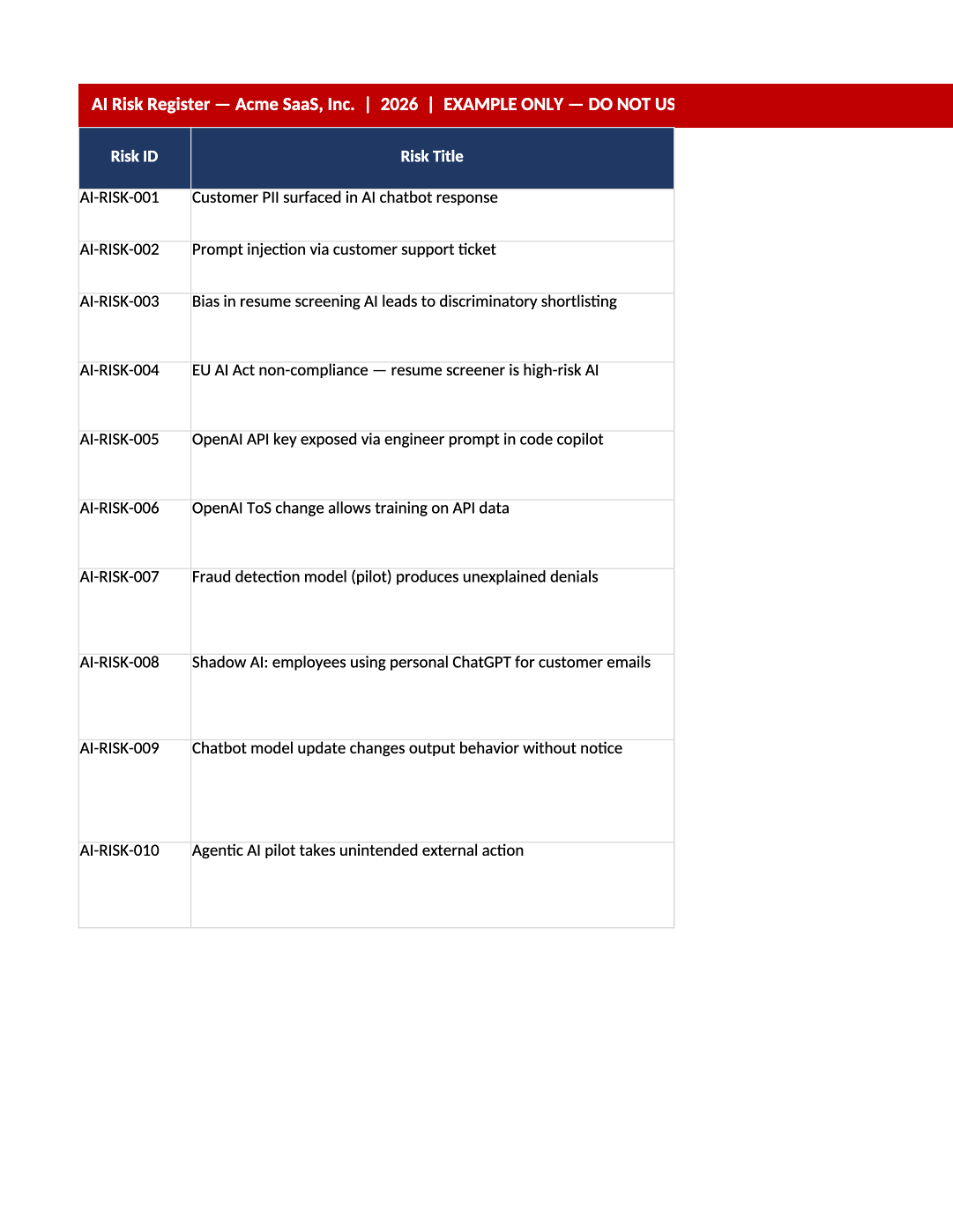
Example Completed AI Risk Register
Acme Corp AI risks aligned to AI-006 sample systems — reference for AI-010 scoring.
Example AI risk register completed — Fictional completed register showing risk ratings and mitigations. Maintain your live register in AI-010; do not submit this example to auditors or regulators.
Recommended Owner: AI Governance Lead
What this file is for
Document purpose
Fictional completed AI risk register (Acme) — shows how AI-014b rows look when fully scored and owned.
In your program: Aligns with AI-006 sample systems; reference only for AI governance assessments.
Before you start
Getting Started
- Example only — sanitized fictional data (Acme Corp). Do not submit to auditors or regulators.
- Copy structure and column usage into your live template (SOC-030, SOC-010, AI-014b, etc.).
- Delete or overwrite every sample row before internal circulation.
Document tour
Fill out the file section by section
Work through the sections below in order. Each block matches a heading or tab in the downloaded AI-SAMP-01 file.
- Describes fictional Acme Corp scope and points to AI-014b as the live workbook.
- After editing About This Example, search for `[` placeholders and gray sample names — auditors flag incomplete templates.
Risk ID
- Assign stable Risk ID values — never reuse an ID for a different record in the audit period.
- Cross-reference IDs in related toolkit docs (SOC-021, COR-014, HR-001, etc.).
Risk Title
- Assign stable Risk Title values — never reuse an ID for a different record in the audit period.
- Cross-reference IDs in related toolkit docs (SOC-021, COR-014, HR-001, etc.).
Risk Description
- Assign stable Risk Description values — never reuse an ID for a different record in the audit period.
- Cross-reference IDs in related toolkit docs (SOC-021, COR-014, HR-001, etc.).
Risk Category
- Assign stable Risk Category values — never reuse an ID for a different record in the audit period.
- Cross-reference IDs in related toolkit docs (SOC-021, COR-014, HR-001, etc.).
Affected System
- Fill Affected System for every in-scope row on About This Example — use dropdowns where provided.
- Do not leave cells blank for active records; use N/A with a short reason if truly not applicable.
Risk Owner
- Assign stable Risk Owner values — never reuse an ID for a different record in the audit period.
- Cross-reference IDs in related toolkit docs (SOC-021, COR-014, HR-001, etc.).
Likelihood (1–5)
- Use dropdown values for Likelihood (1–5) — align definitions with COR-003, COR-008, or COR-009.
- Inconsistent scoring between this file and meeting minutes (SOC-017/SOC-019) triggers auditor questions.
Impact (1–5)
- Use dropdown values for Impact (1–5) — align definitions with COR-003, COR-008, or COR-009.
- Inconsistent scoring between this file and meeting minutes (SOC-017/SOC-019) triggers auditor questions.
Inherent Score
- Fill Inherent Score for every in-scope row on About This Example — use dropdowns where provided.
- Do not leave cells blank for active records; use N/A with a short reason if truly not applicable.
Inherent Level
- Fill Inherent Level for every in-scope row on About This Example — use dropdowns where provided.
- Do not leave cells blank for active records; use N/A with a short reason if truly not applicable.
Current Controls
- Fill Current Controls for every in-scope row on About This Example — use dropdowns where provided.
- Do not leave cells blank for active records; use N/A with a short reason if truly not applicable.
Likelihood After Controls
- Use dropdown values for Likelihood After Controls — align definitions with COR-003, COR-008, or COR-009.
- Inconsistent scoring between this file and meeting minutes (SOC-017/SOC-019) triggers auditor questions.
Impact After Controls
- Use dropdown values for Impact After Controls — align definitions with COR-003, COR-008, or COR-009.
- Inconsistent scoring between this file and meeting minutes (SOC-017/SOC-019) triggers auditor questions.
Residual Score
- Fill Residual Score for every in-scope row on About This Example — use dropdowns where provided.
- Do not leave cells blank for active records; use N/A with a short reason if truly not applicable.
Residual Level
- Fill Residual Level for every in-scope row on About This Example — use dropdowns where provided.
- Do not leave cells blank for active records; use N/A with a short reason if truly not applicable.
Treatment
- Fill Treatment for every in-scope row on About This Example — use dropdowns where provided.
- Do not leave cells blank for active records; use N/A with a short reason if truly not applicable.
- Review likelihood, impact, inherent/residual ratings, and mitigation columns per AI system.
- Cross-check System IDs with your AI-006 register — do not copy Acme system names.
- Note formula-driven score columns — your live AI-014b uses the same pattern.
Risk ID
- Assign stable Risk ID values — never reuse an ID for a different record in the audit period.
- Cross-reference IDs in related toolkit docs (SOC-021, COR-014, HR-001, etc.).
Risk Title
- Assign stable Risk Title values — never reuse an ID for a different record in the audit period.
- Cross-reference IDs in related toolkit docs (SOC-021, COR-014, HR-001, etc.).
Risk Description
- Assign stable Risk Description values — never reuse an ID for a different record in the audit period.
- Cross-reference IDs in related toolkit docs (SOC-021, COR-014, HR-001, etc.).
Risk Category
- Assign stable Risk Category values — never reuse an ID for a different record in the audit period.
- Cross-reference IDs in related toolkit docs (SOC-021, COR-014, HR-001, etc.).
Affected System
- Fill Affected System for every in-scope row on AI Risk Register — use dropdowns where provided.
- Do not leave cells blank for active records; use N/A with a short reason if truly not applicable.
Risk Owner
- Assign stable Risk Owner values — never reuse an ID for a different record in the audit period.
- Cross-reference IDs in related toolkit docs (SOC-021, COR-014, HR-001, etc.).
Likelihood (1–5)
- Use dropdown values for Likelihood (1–5) — align definitions with COR-003, COR-008, or COR-009.
- Inconsistent scoring between this file and meeting minutes (SOC-017/SOC-019) triggers auditor questions.
Impact (1–5)
- Use dropdown values for Impact (1–5) — align definitions with COR-003, COR-008, or COR-009.
- Inconsistent scoring between this file and meeting minutes (SOC-017/SOC-019) triggers auditor questions.
Inherent Score
- Fill Inherent Score for every in-scope row on AI Risk Register — use dropdowns where provided.
- Do not leave cells blank for active records; use N/A with a short reason if truly not applicable.
Inherent Level
- Fill Inherent Level for every in-scope row on AI Risk Register — use dropdowns where provided.
- Do not leave cells blank for active records; use N/A with a short reason if truly not applicable.
Current Controls
- Fill Current Controls for every in-scope row on AI Risk Register — use dropdowns where provided.
- Do not leave cells blank for active records; use N/A with a short reason if truly not applicable.
Likelihood After Controls
- Use dropdown values for Likelihood After Controls — align definitions with COR-003, COR-008, or COR-009.
- Inconsistent scoring between this file and meeting minutes (SOC-017/SOC-019) triggers auditor questions.
Impact After Controls
- Use dropdown values for Impact After Controls — align definitions with COR-003, COR-008, or COR-009.
- Inconsistent scoring between this file and meeting minutes (SOC-017/SOC-019) triggers auditor questions.
Residual Score
- Fill Residual Score for every in-scope row on AI Risk Register — use dropdowns where provided.
- Do not leave cells blank for active records; use N/A with a short reason if truly not applicable.
Residual Level
- Fill Residual Level for every in-scope row on AI Risk Register — use dropdowns where provided.
- Do not leave cells blank for active records; use N/A with a short reason if truly not applicable.
Treatment
- Fill Treatment for every in-scope row on AI Risk Register — use dropdowns where provided.
- Do not leave cells blank for active records; use N/A with a short reason if truly not applicable.
- Rollup metrics — your AI-014b Residual Risk Summary tab should show similar open/high counts.
- Use dashboard counts in AI governance steering meetings (AI-001 program).
- Example heatmap colors map to Critical/High/Medium/Low — match AI-014b Rating Key.
Quality check
Before You Finalize
- Maintain production risks in AI-014b — do not rename Acme systems in this file and call it done.
- Legal/compliance review still required for high-risk AI use cases in your environment.
Evidence
Where to Store It
- Store the completed file in your compliance evidence folder (signed PDF for policies).
- Register the document in COR-013 with version, owner, and next review date.
- Link the file from your evidence index or SOC-005 project plan when you use Phase 3 trackers.