Information Security Policy
Your company’s main rulebook for security. Tell your team and auditors how you protect data, manage access, and handle incidents.
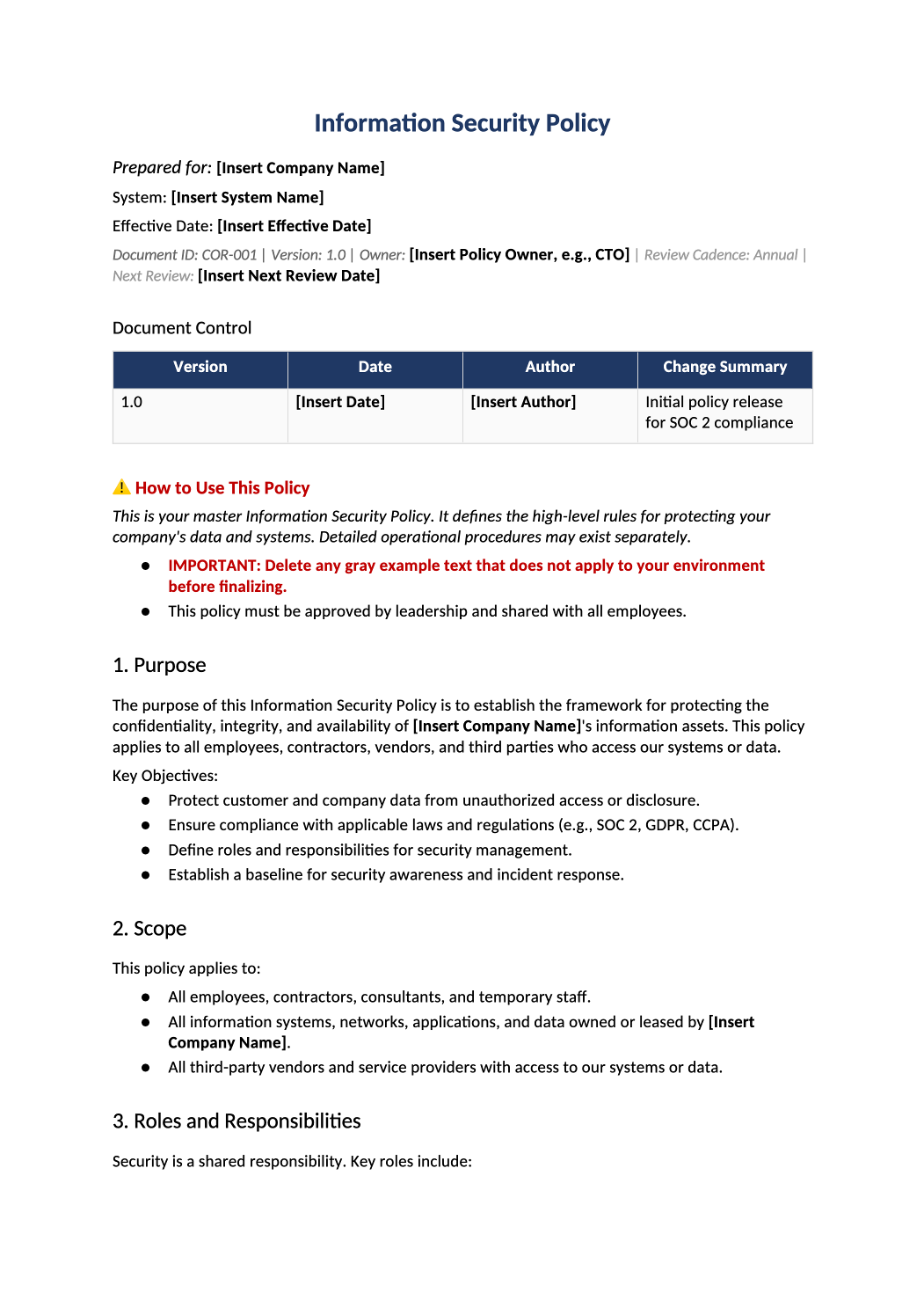
Establish your security foundation in one document.
Roles, access controls, acceptable use, incident response, and training requirements — all in one auditor-ready policy template.
Download Information Security Policy (.docx)Information security policy template — This template is your company’s main rulebook for security. It tells your team (and auditors) how you protect data, manage access, and handle incidents.
Recommended Owner: CTO, Head of Engineering, or Compliance Lead | Approval Required: Executive Leadership (CEO/CTO)
Section 1
Getting Started
- Enable Editing: Click “Enable Editing” in Word.
- Fill in the Blanks: Replace all [Bold Brackets] with your company’s specific details.
- Check the Examples: The [Regular Brackets] are just suggestions. Feel free to change them to match how your company actually works.
If a section doesn’t apply to you (you don’t have physical servers), you can delete it.
Section 2
Key Things to Decide
Before you start, think about these questions:
-
Who is in charge? Who is the “Security Lead”? In small startups, this is often the CTO or Engineering Lead. That’s fine—just list them.
-
How do we handle access? Do you use MFA? (You should!) Do you use a tool like Okta or Google Workspace? Document MFA and identity tools in Section 4 (Access Control) and Section 7 (Acceptable Use).
-
What do we do if something goes wrong? Who do people call if they see a security issue? Document incident reporting in Section 10 (Incident Response and Business Continuity).
Document tour
Section-by-section walkthrough
Open the downloaded COR-001 file in Microsoft Word. Use the headings below as your checklist — complete each section before the final approval block.
- Replace [Insert Company Name] and confirm the objectives match what you actually commit to in SOC 2 and customer contracts.
- Delete gray example bullets if they do not apply to your stage (e.g., GDPR if you have no EU data).
- List every workforce type (employees, contractors) and every system class in scope (prod, corporate IT, SaaS admin consoles).
- Align wording with SOC-004 System Description and SOC-002 scoping answers.
- Fill the roles table with real names or titles — match COR-005 Organizational Chart if you use it.
- If one person wears multiple hats, document that explicitly; auditors expect named accountability.
- Update MFA, password, review, and termination language to match production (not aspirational).
- Describe how laptops and cloud resources are inventoried — link to SOC-014 if you maintain an asset register.
- Keep the classification table; remove tiers you do not use. Align labels with COR-009 if published separately.
- Only include controls you enforce (MDM, encryption, patching SLAs). Remove tools you do not use.
- Reference your real SDLC: code review, CI, branch protections — align with SOC-007 / SOC-011 / SOC-012.
- Describe vendor security review and DPA requirements — cross-link PRI-004 for privacy vendors.
- Replace [Insert Incident Contact] with email, Slack channel, or pager — match COR-007 incident policy.
- State onboarding + annual training and name the platform (KnowBe4, internal deck, etc.).
- Document how exceptions are requested, approved, and time-boxed — use COR-015 exception log if applicable.
- Complete the signature table with name, title, and date — store the signed PDF for auditors.
13.1 SOC 2 Common Criteria Mapping
- Leave mapping tables as-is unless your scope excludes criteria; they help auditors navigate the policy.
Section 4
Before You Finalize
- Did you replace all [Bold Brackets]?
- Did you remove any [Example Text] that doesn’t apply?
- Does the “Security Lead” name match your org chart?
- Did leadership sign Section 13 (Review and Approval)?
Section 5
Where to Store It
- Save the signed PDF in your central compliance folder.
- Share it with your whole team! A policy only works if people know it exists.
Pro Tips
Pro Tips for Success
- Keep It Real: Don’t promise things you can’t do. If you say “we review logs daily,” but you only do it weekly, change the text. Auditors prefer honesty over perfection.
- Link to Other Docs: If you have separate documents for “Incident Response” or “Vendor Management,” you can reference them here. It keeps this document shorter.
- Update Annually: Review this once a year to make sure it still matches how your company operates.
FAQ
Frequently Asked Questions
No. For most startups, the CTO or Engineering Lead acts as the Security Lead. Just make sure their responsibilities are clear.
You can skip the “Physical Security” parts or note that you are a remote-only company.
High-level is better. This is a policy (the rules), not a procedure (the step-by-step instructions). Keep it broad enough that it won’t need updating every time you change a tool.