Record of Processing Activities (RoPA)
Your central data inventory. Map what personal data you collect, why, who you share it with, and how long you keep it.
Map your data flows for GDPR & privacy compliance.
Automated dashboard, processing activity register, vendor mapping, international transfer tracking, and risk highlighting — all pre-formatted.
Record of processing activities template — This document is your central data inventory. It maps what personal data you collect, why you collect it, who you share it with, and how long you keep it.
Follow this step-by-step guide to complete your compliance mapping.
Before You Start
Understanding Visual Cues
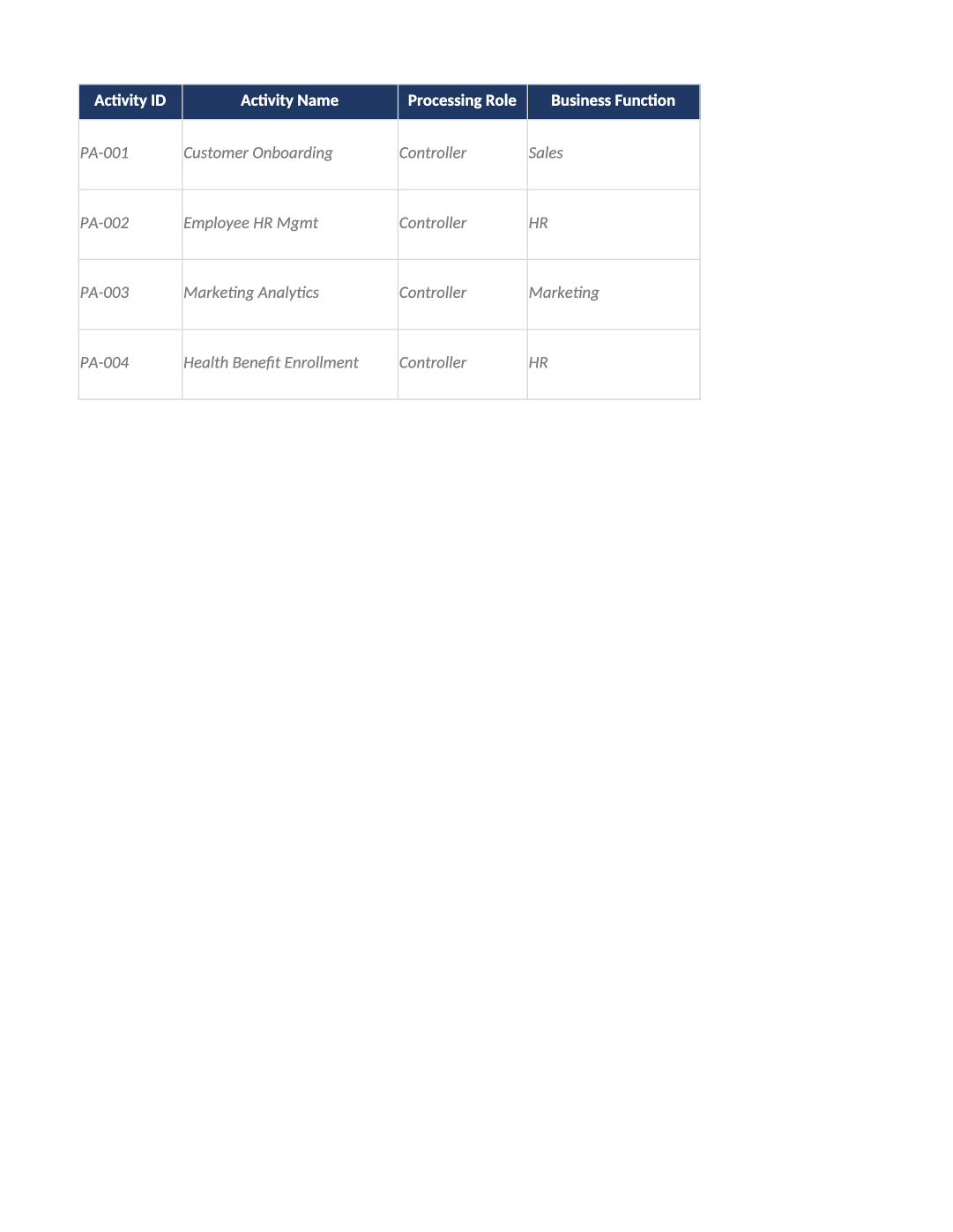
These cells contain sample data. Overwrite them with your actual company information. The gray background will disappear when you type.
Start typing in the first white row below the examples to add new activities.
This appears automatically. If you select “Sensitive Data” (e.g., Health, Biometric) or mark an activity as requiring a DPIA, the row turns yellow. This flags items that require extra security attention.
Click cells with a small arrow to select standard legal terms. Do not type manually into these cells if a dropdown exists.
Tab 1
Dashboard (Read-Only)
- Purpose: Provides a real-time health check of your privacy program.
- Action: No action needed. The numbers update automatically as you fill out the other tabs.
- Key Metric: Monitor “High Risk Activities.” If this number is high, review the Yellow-highlighted rows in Tab 3.
Tab 2
Instructions (Metadata)
Purpose: Document control and versioning.
Action: Update the following editable fields:
- Version: Start at 1.0. Increment to 1.1 whenever you make significant changes.
- Owner: Assign a specific person (“CTO,” “Privacy Officer”).
- Last Updated: Change this date whenever you review the document.
Tab 3
Processing Activities (The Core Work)
Fill out one row per distinct business activity. Do not list every database table; group by purpose.
Activity ID: Create a unique code (e.g., PA-001, PA-002).
Activity Name: Short, clear name (“Customer Onboarding,” “Employee Payroll”).
Role: Controller: You decide why and how data is used (most startups for their own user data). Processor: You process data on behalf of a client (a SaaS platform hosting client data).
Business Function: Select the department (Sales, HR, Marketing, Product).
Description: Briefly explain the process. Example: “We collect email and name to create user accounts and provide service access.”
Data Subjects: Who does the data belong to? (Customers, Employees, Prospects).
EU Data Subjects? Select Yes if any of these people are located in the EU/UK.
Children’s Data? Select Yes only if you knowingly collect data from under-16s.
Data Types: List specific fields. Example: “Name, Email, IP Address, Payment Token.”
Sensitive Data: CRITICAL. Select “None” unless you process Health, Biometric, Religious, Political, Union, Criminal, Genetic, or Sexual Orientation data. Selecting anything other than “None” turns the row Yellow.
Source: Where did the data come from? (“Direct from User,” “Cookies,” “Third-party API”).
Purpose: Why are you processing this? (“Service Delivery,” “Marketing,” “Fraud Prevention”).
Legal Basis (GDPR): Contract: Necessary to provide the service (e.g., login credentials). Consent: User explicitly opted in (e.g., marketing newsletters). Legitimate Interest: Balanced interest (e.g., security logs, fraud detection). Legal Obligation: Required by law (e.g., tax records).
Legal Basis Notes: Justify your choice. Example: “Required to authenticate user identity.”
LIA Completed? If you selected “Legitimate Interest,” have you done a Legitimate Interest Assessment? Select Yes/No.
Frequency: How often is data processed? (Continuous, Daily, Monthly).
Recipients: Who sees the data? List internal teams or external vendors.
Specific Vendors (IDs): Link to Tab 4. Enter the Vendor ID (e.g., VND-001) from the Subprocessors tab. This connects your data flow to your vendor list.
Systems Involved: What software stores this data? (Salesforce, AWS, HubSpot).
Intl Transfer? Does data leave the EU/UK? (e.g., stored on US servers). Select Yes/No.
Transfer Mechanism: If Yes, how is it legal? (“SCCs (2021),” “EU-US Data Privacy Framework”).
Retention Period: How long do you keep it? Example: “Active Contract + 3 Years.” Do not use “Indefinite.”
Retention Justification: Why keep it this long? (“Statutory Requirement,” “Contractual Necessity”).
Deletion Method: How is it destroyed? (“Automated Policy,” “Manual Deletion”).
Auto. Decision Making? Do algorithms make legal/significant decisions without human input? (e.g., automated loan denial).
Security Measures: List controls. Example: “Encryption at rest, MFA, RBAC.”
DPIA Required? If you selected Sensitive Data or High-Risk Monitoring, select Yes.
Internal Owner: Who is responsible? (CTO, HR Director).
Linked Policies: Which internal policy governs this? (“PRI-003 Privacy Notice”).
Status: Active, Deprecated, or Planned.
Dates: Set “Last Reviewed” to today. Set “Next Review” to 1 year from now.
Tab 4
Subprocessors & Vendors
List every third-party service that touches personal data.
Tab 5
International Data Transfers
Only fill this if you selected “Yes” for Intl Transfer in Tab 3.
Checklist
Final Checklist Before Saving
- Did you remove all Gray Example Text that doesn’t apply to you?
- Are all Yellow Highlights justified (do you have a DPIA or extra security for them)?
- Did you link every vendor in Tab 3 to a valid ID in Tab 4?
- Is your Retention Period specific (not “Indefinite”)?
- Did you update the Version and Last Updated date in Tab 2?
- Did you save the file as PRI-001_RoPA_[YourCompany]_v1.xlsx?