Sample Evidence Package (Example Only)
ZIP with manifest and sanitized exports — shows how to organize PBC-style evidence.
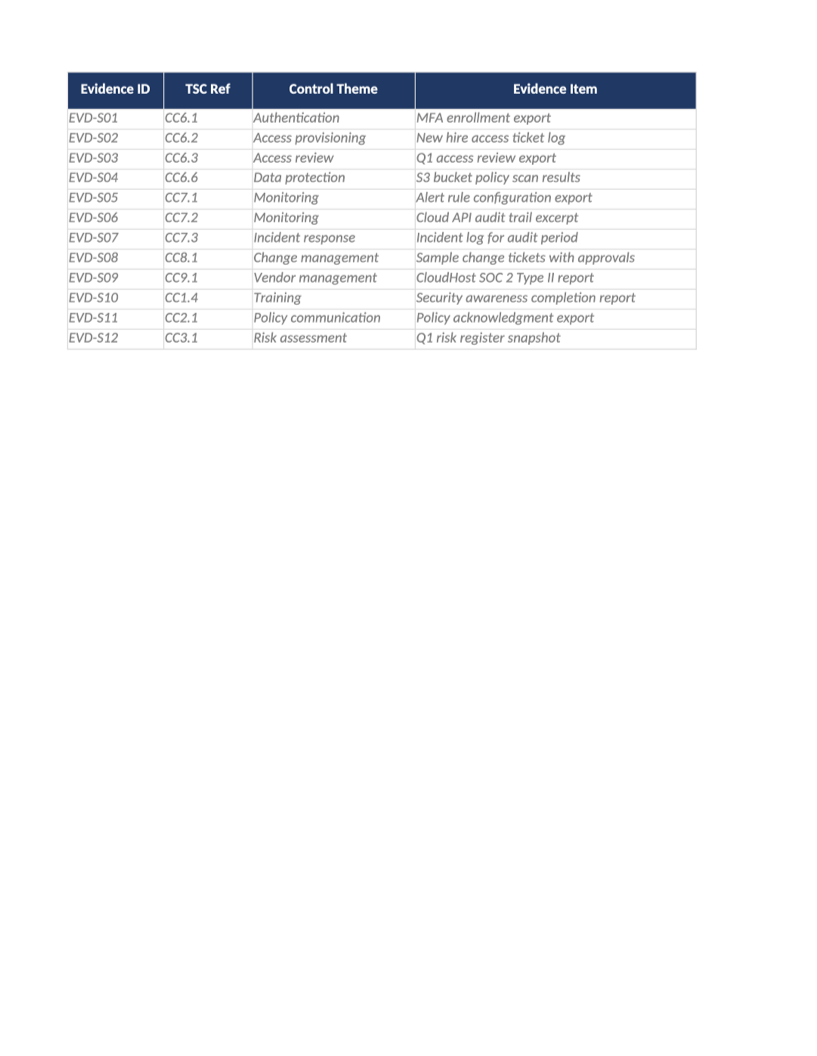
Sample Evidence Package
ZIP with manifest and sanitized exports — shows how to organize PBC-style evidence.
Sample SOC 2 evidence package example — Illustrates folder layout and manifest indexing for auditor requests. Replace every file with your real exports before fieldwork.
Recommended Owner: Security Lead or GRC analyst
What this file is for
Document purpose
Example evidence ZIP — README, manifest spreadsheet, and sanitized export snippets for PBC organization.
In your program: Organizational reference for SOC-021 Evidence Index and SOC-028 PBC tracker — not submit-ready.
Before you start
Getting Started
- Example only — sanitized fictional data (Acme Corp). Do not submit to auditors or regulators.
- Copy structure and column usage into your live template (SOC-030, SOC-010, AI-014b, etc.).
- Delete or overwrite every sample row before internal circulation.
- Unzip and read README.txt first — lists fictional files and how they would map to EVD-### IDs.
Document tour
Fill out the file section by section
Work through the sections below in order. Each block matches a heading or tab in the downloaded SOC-SAMP-05 file.
- Explains package purpose and sanitized-data warning — read before copying folder structure.
- Use as a checklist of evidence types auditors commonly request for CC6–CC8.
- Replace every file listed in README with live exports from your systems before fieldwork.
- Example index rows — mirror column layout in SOC-021 (EVD ID, TSC, source, path, date).
- Each manifest row should point to a real export in your production PBC folder.
- Status column shows Accepted vs Under Review — match SOC-028 auditor status workflow.
Evidence ID
- Fill Evidence ID with a URL, ticket, or export path auditors can open — not a local-only path.
- Re-verify links before fieldwork; broken evidence links are a common audit finding.
TSC Ref
- Fill TSC Ref for every in-scope row on Evidence Index — use dropdowns where provided.
- Do not leave cells blank for active records; use N/A with a short reason if truly not applicable.
Control Theme
- Fill Control Theme for every in-scope row on Evidence Index — use dropdowns where provided.
- Do not leave cells blank for active records; use N/A with a short reason if truly not applicable.
Evidence Item
- Fill Evidence Item with a URL, ticket, or export path auditors can open — not a local-only path.
- Re-verify links before fieldwork; broken evidence links are a common audit finding.
File / Location
- Fill File / Location for every in-scope row on Evidence Index — use dropdowns where provided.
- Do not leave cells blank for active records; use N/A with a short reason if truly not applicable.
Period
- Fill Period for every in-scope row on Evidence Index — use dropdowns where provided.
- Do not leave cells blank for active records; use N/A with a short reason if truly not applicable.
Owner
- Name a person (not a team inbox) in Owner — auditors interview control owners.
- Must match COR-005 org chart or SOC-024 control owner assignments where applicable.
Status
- Select Status from the dropdown — free text breaks Dashboard formulas and heatmaps.
- Update through the lifecycle (Not Started → In Progress → Complete/Closed) before sign-off.
- Text excerpts show redaction style — your exports must come from live systems (CloudTrail, MDM, LMS).
- Name files consistently so SOC-028 PBC rows map 1:1 to paths in your evidence repository.
- Do not submit this ZIP to auditors — build your own package indexed in SOC-021.
Quality check
Before You Finalize
- Replace every file in the ZIP with real exports (CloudTrail, MDM, training, access review, change tickets).
- Index real items in SOC-021 before sending PBC to auditors.
Evidence
Where to Store It
- Store the completed file in your compliance evidence folder (signed PDF for policies).
- Register the document in COR-013 with version, owner, and next review date.
- Link the file from your evidence index or SOC-005 project plan when you use Phase 3 trackers.