SOC 2 Scoping Questionnaire
Define the official boundary of your SOC 2 audit – systems, personnel, vendors, and controls.
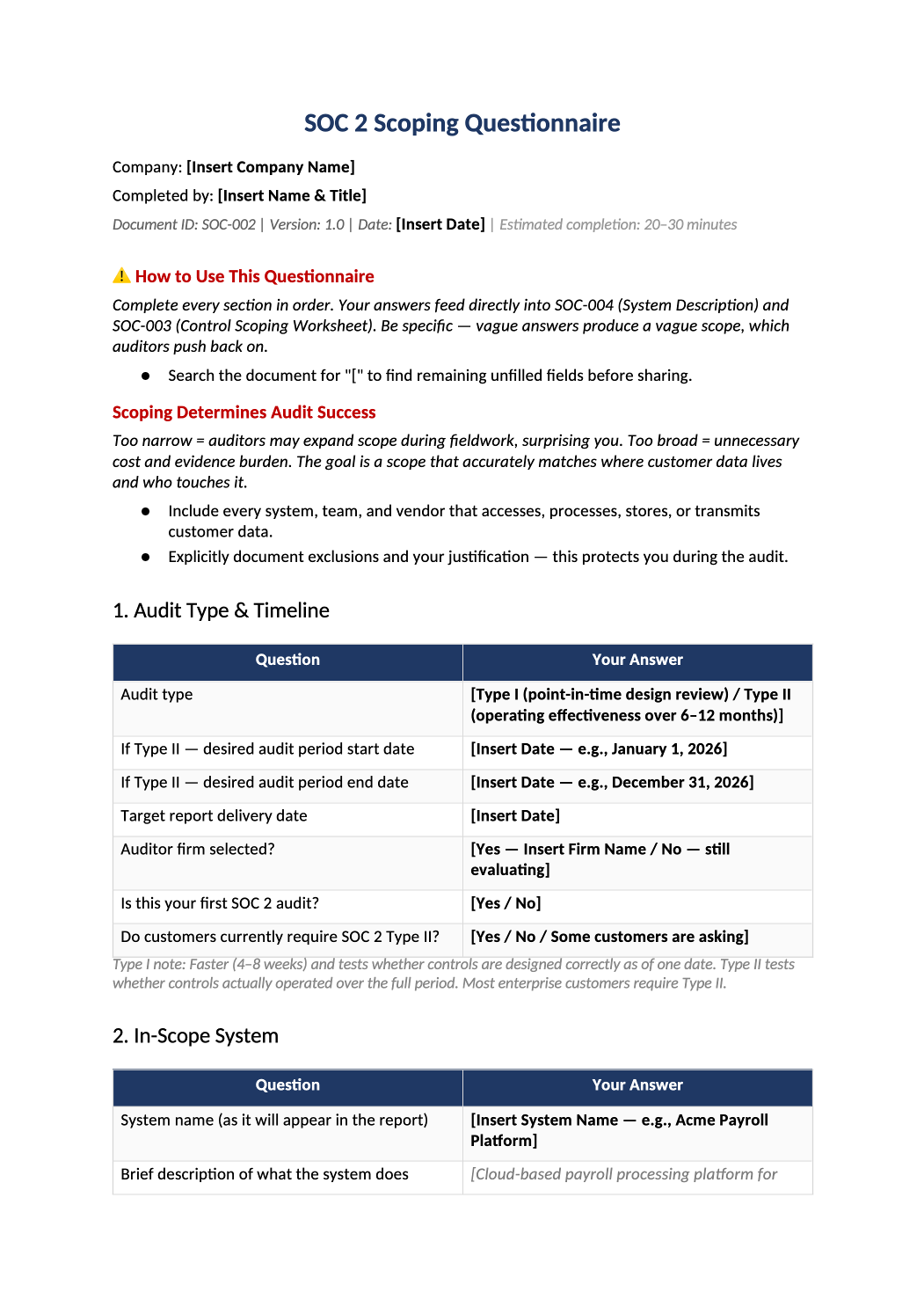
Define your audit scope in one document.
Audit type selection, system boundaries, personnel, vendors, and Trust Services Criteria – all in one structured template.
Download Scoping QuestionnaireThis questionnaire is designed to help your organization define the official boundary of your SOC 2 audit. Your responses determine which systems, personnel, vendors, environments, and controls are included in the assessment. The information collected here will later support SOC-004 System Description Workbook, Control Inventory, Risk Register, Vendor Management Documentation, and auditor scoping discussions.
Step 1
Replace All Placeholder Fields
Throughout this questionnaire, you will see placeholder fields marked in bold brackets, such as:
- [Insert Company Name]
- [Insert System Name]
- [Insert Vendor]
- [Insert Date]
Action: Delete the bracketed text and replace it with information specific to your organization.
Pro Tip: In Microsoft Word, press Ctrl+F (or Cmd+F) and search for [ to jump instantly to every field.
Before sharing this document externally or with an auditor, remove or finalize all placeholder text and instructional content.
Step 2
Select Your Audit Type
Your audit type affects timeline, evidence requirements, and customer expectations.
-
Type I Evaluates whether controls are designed at a specific point in time. Faster, less operational intensity.
-
Type II Evaluates whether controls operated effectively over a period (3–12 months). Requires continuous evidence.
Action: Select the audit type that aligns with your business goals. If unsure, start with Type I.
Step 3
Define Your In-Scope System
Your “In-Scope System” defines the exact environment being audited.
Be Specific: Instead of “Our application,” use “Production environment supporting customer payroll processing.”
Why It Matters: Your scope determines what auditors test, which systems require evidence, and which employees fall under review.
Avoid defining scope too broadly. Over-scoping increases audit cost and operational burden.
Step 4
Define Your Business Model
This section helps auditors understand what your company does and who your customers are.
- 1Primary Service: e.g., Cloud-based HR platform, AI document processing service.
- 2Primary Customer Type: e.g., SMB healthcare providers, Enterprise financial institutions.
Your customer type influences applicable Trust Services Criteria (TSC) and data sensitivity requirements.
Step 5
Identify Personnel in Scope
Auditors must understand which personnel can access production systems or customer data.
- Include: Engineers, DevOps, Customer Support, Contractors, Administrators, and IT personnel.
- If a person (including contractors) can access production systems, they are generally in scope and may require background checks and MFA.
Step 6
Complete the CC Series Mapping
The CC Series represents the Common Criteria categories within SOC 2.
- Default to “Yes” for CC1–CC9
- Use Notes column for exclusions (e.g., “CC8 Change Management via IaC”)
- This mapping builds your control inventory and organizes evidence
These mappings help build your control inventory and organize evidence requests.
Step 7
Select Applicable Trust Services Criteria
Every SOC 2 audit includes Security. Additional criteria depend on your environment:
-
Availability If you offer uptime guarantees or SLAs
-
Confidentiality If you handle sensitive business information
-
Processing Integrity If you perform financial calculations
-
Privacy If you process personal information (GDPR, CCPA)
Selecting unnecessary TSC categories increases audit scope and cost.
Step 8
Define Explicit Exclusions
This section identifies what is NOT included in the audit.
- Common Exclusions: Staging environments, development sandboxes, test databases, internal-only tools.
- Action: List the excluded asset and the reason (e.g., “Staging environment — No customer data stored”).
Do not exclude systems processing customer data or administrative systems with production access. Poorly defined exclusions are a common source of audit findings.
Step 9
Document Hosting & Infrastructure
Describe where your systems are hosted and your core technology stack.
- AWS / Azure / GCP
- React / Node.js
- PostgreSQL / MongoDB
- Kubernetes / Docker
Auditors use this to understand your technical environment and determine inherited cloud-provider controls.
Step 10
Define Authentication & Access Controls
This section evaluates your identity and access management structure.
- Identity Providers: Okta, Google Workspace, Azure AD, Auth0
- MFA Enforcement: SOC 2 expects MFA for production and administrative access
If MFA is not enforced for production access, this will likely become a major audit concern.
Step 11
Classify Your Data Types
Identify the types of information processed within the in-scope system.
- Public Data
- Confidential Data
- PII (Names/Emails)
- Sensitive PII (SSNs/Health Records)
- Payment Data
Data classification directly impacts encryption requirements, access controls, and vendor management.
Step 12
Document Vendors & Subservice Organizations
List all vendors that host infrastructure, store customer data, or provide critical services.
- AWS
- Google Workspace
- GitHub
- Stripe
- Okta
- Datadog
Auditors may request SOC reports or security assessments for these vendors. Missing major vendors can delay audits.
Step 13
Review Next Steps
After completing this questionnaire, your organization should be ready to:
- Build the System Description Workbook (SOC-004)
- Create the Control Inventory
- Begin policy implementation
- Start evidence collection planning
- Engage potential auditors
Step 14
Keep Documentation Consistent
Consistency across all documents is critical during a SOC 2 audit. Ensure the following remain aligned across your toolkit:
- Company name
- System name
- Audit type
- Scope boundaries
- Infrastructure descriptions
- Vendor names
- Version numbers
Inconsistent information across documents is a common source of auditor questions and delays.